 LED Banner
 How to make your iPhone look like an LED sign or neon display
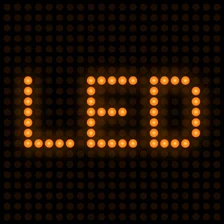
In LED Banner, open the LED panel and choose Classic under LED Style: your text turns into a grid of round glowing dots, like a real LED board. Then set the dot size with Pixel Size and LED Spacing, and pick a color such as Retro LED, Matrix or Neon.

The dot grid is what makes it look like a real LED board
A real LED sign is a panel of separate lights with dark gaps between them. LED Banner draws the same thing on your screen: it lays a grid over your text and lights a round dot in every cell that the letters cover. Zoom into a photo of a bus-stop display and you will see the same grid; this app just draws it in software. Everything outside the letters stays dark.
Get the LED look, step by step
- Open a banner, or tap New Banner on the Create tab.
- Tap LED and pick Classic under LED Style. None switches the dots off and shows plain text.
- Drag Pixel Size (1 to 20 pt, 4 by default) to set how big each dot is.
- Drag LED Spacing (0 to 12 pt, 2 by default) to set the dark gap between dots.
- Use Glow (0 to 1) for a wider halo around each dot, and Brightness to dim the text if you need to.
- Tap Color and choose a Color Mode, then tap Full Screen.
How big should the dots be?
Each dot sits in a square cell that is Pixel Size plus LED Spacing wide. Dividing the screen by the cell tells you how many dots fit. On a 6.1-inch iPhone in landscape (852 by 393 pt):
| Pixel Size / LED Spacing | Cell | Dots across | Dot rows |
|---|---|---|---|
| 4 / 2 (default) | 6 pt | 142 | 65.5 |
| 8 / 4 | 12 pt | 71 | 32.8 |
| 12 / 0 | 12 pt | 71 | 32.8 |
Small dots, like the default, keep letters smooth and detailed. Bigger cells make a chunkier, more retro sign that is closer to a real street display; with LED Spacing at 0 the dots touch and the gaps almost disappear. With big dots, raise Size in Text so each letter still covers enough of them to be readable.
Which color mode looks like LED or neon?
- Retro LED: classic orange, like a station or shop board.
- Matrix: bright green, the computer-terminal look.
- Neon: magenta, closest to a neon tube sign. Cyberpunk mode gives cyan instead.
- Gold and Ice: warm yellow and cold light blue.
- Rainbow: the text cycles through every color, a full round every 4 seconds.
- Solid: one color you choose from 10 Quick Colors. The full color picker is part of LED Banner Pro.
In the free version, 9 of the 12 color modes are available. Gradient, Fire and Police are part of LED Banner Pro.
What about the other LED styles?
Classic is free. Round, Square, Pixel and Glow are part of LED Banner Pro. To be straight with you: every style draws round dots, and Round currently looks the same as Classic. Square is round dots without the glow halo, Pixel uses dots of at least 6 pt with 1 pt gaps and no glow, and Glow doubles the halo and adds a blur set by the Bloom slider. Bloom has no effect on the other styles.
The Effects panel adds extra looks on top, such as CRT, Scanlines and Mirror. These are part of LED Banner Pro too.
What this app is not
LED Banner shows the sign live on your iPhone or iPad. It cannot export an image, GIF or video of the LED text, and it cannot send it to a TV or a real LED panel. If you need an LED text effect for a graphic or a video, use a design tool instead.
Questions and answers
Is there a free LED sign app for iPhone?
Can I make the dots square?
Why does Brightness not make the sign brighter?
Does it work on iPad?
You might also like
- How to make a light-up concert sign on your phone · LED Banner
More LED Banner guides
- How to make scrolling text on iPhone, like an LED ticker
- How to make an airport pickup sign on your phone
- How to make a light-up concert sign on your phone
- How to show big text on your phone screen, full screen
- How to use an iPad or spare iPhone as a scrolling shop sign
- How do I make an uchiwa-style fan sign with a phone app?
- How do I make a happy birthday sign on my phone?
- How do I use my iPhone or iPad as a welcome sign?
- All questions about LED Banner
- Back to LED Banner