RigMaster, the rigging calculator for sling tension and hitch capacity
Sling Tension & Load Weight
RigMaster tells you the tension in each sling leg, the horizontal sling angle from a length and height you measure yourself, and what your own sling can take in a choker or basket hitch. We built it for riggers, crane operators, signal persons and apprentices who want a fast, honest check before a pick — not a replacement for the tag on the sling or the crane's load chart.

Sling tension
Sling tension in seconds
Works offline, in lb or kg
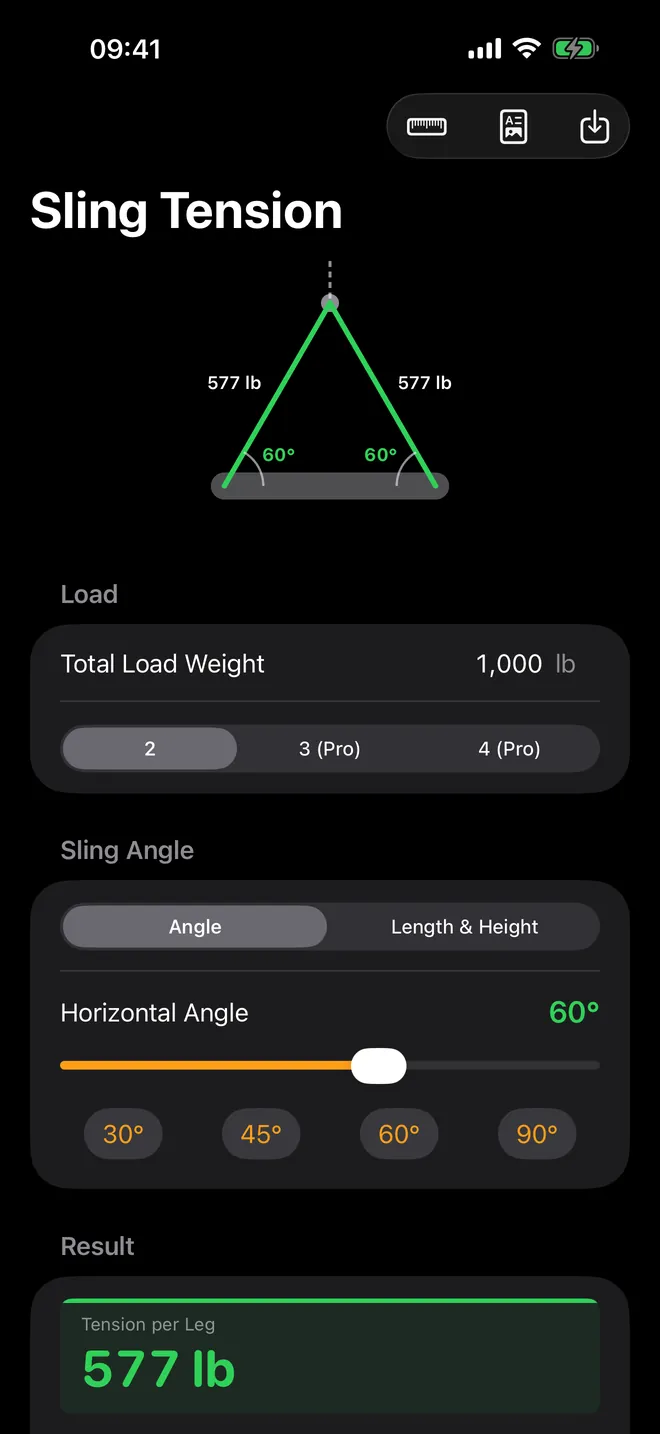
Unequal legs · Pro
Off-center picks, solved
Unequal legs with the CoG offset · Pro
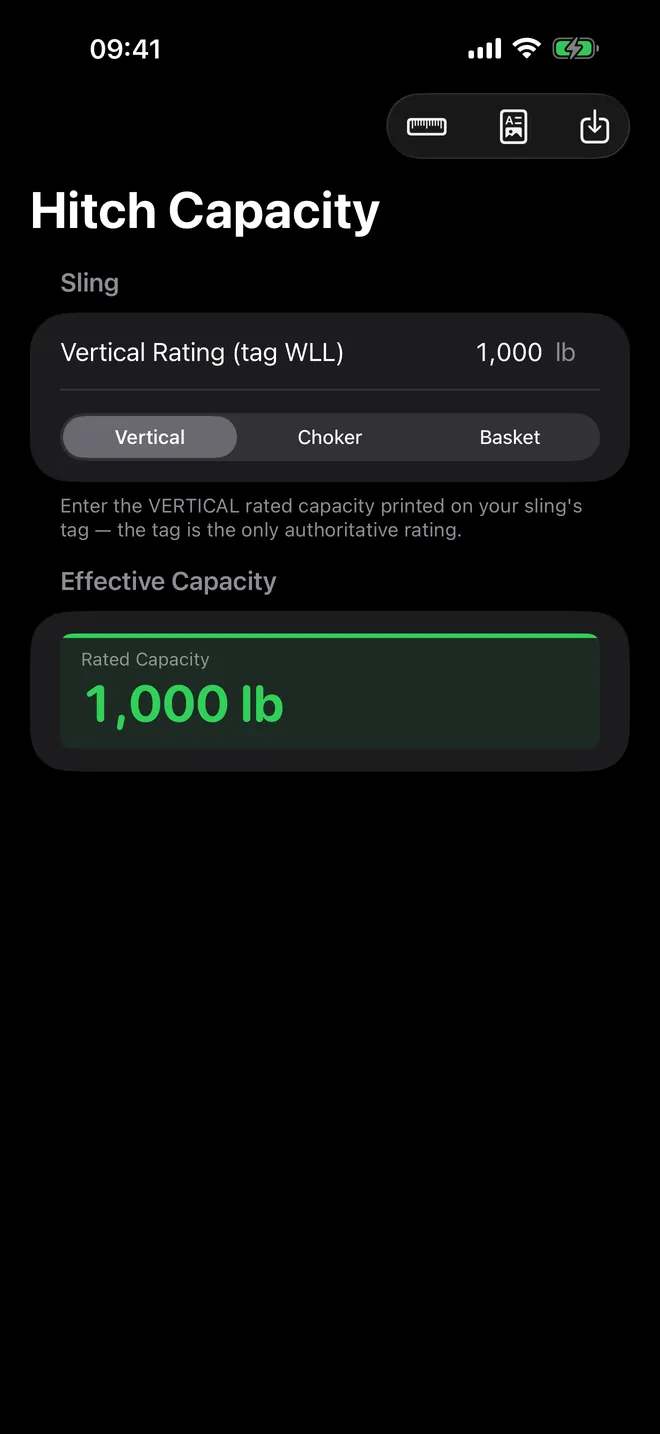
Hitch capacity
Choker, basket or vertical
Hitch capacity from your own sling tag
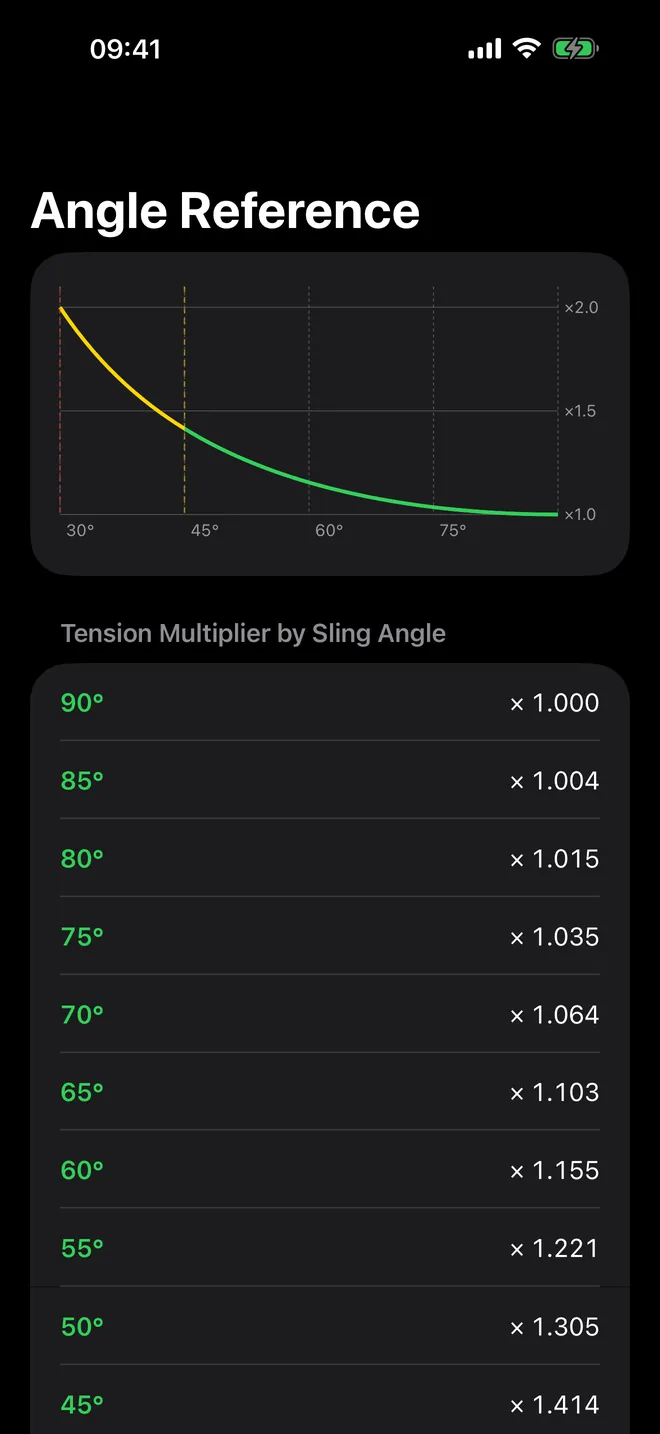
Angle reference
Angle factors at a glance
Tension multiplier from 90° to 30°
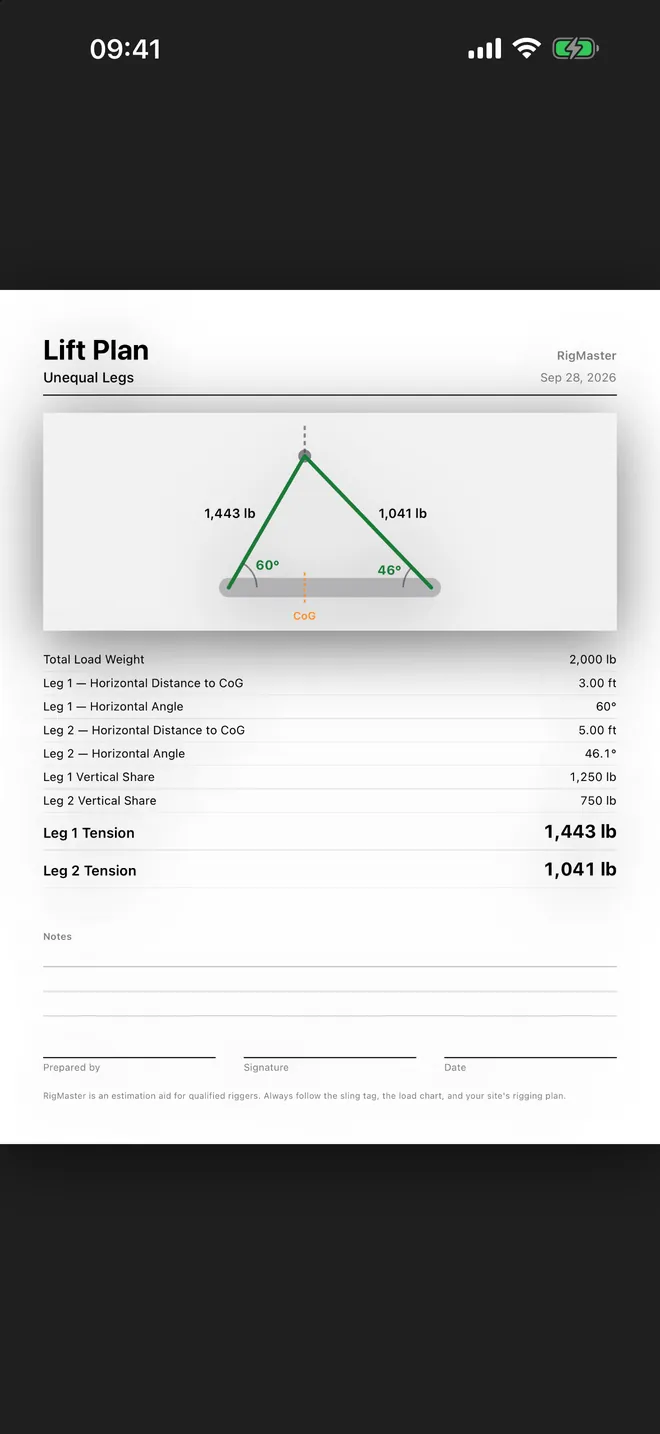
Lift plan · Pro
Hand over a lift plan PDF
One page with the diagram · Pro
What can you calculate?
Free calculators
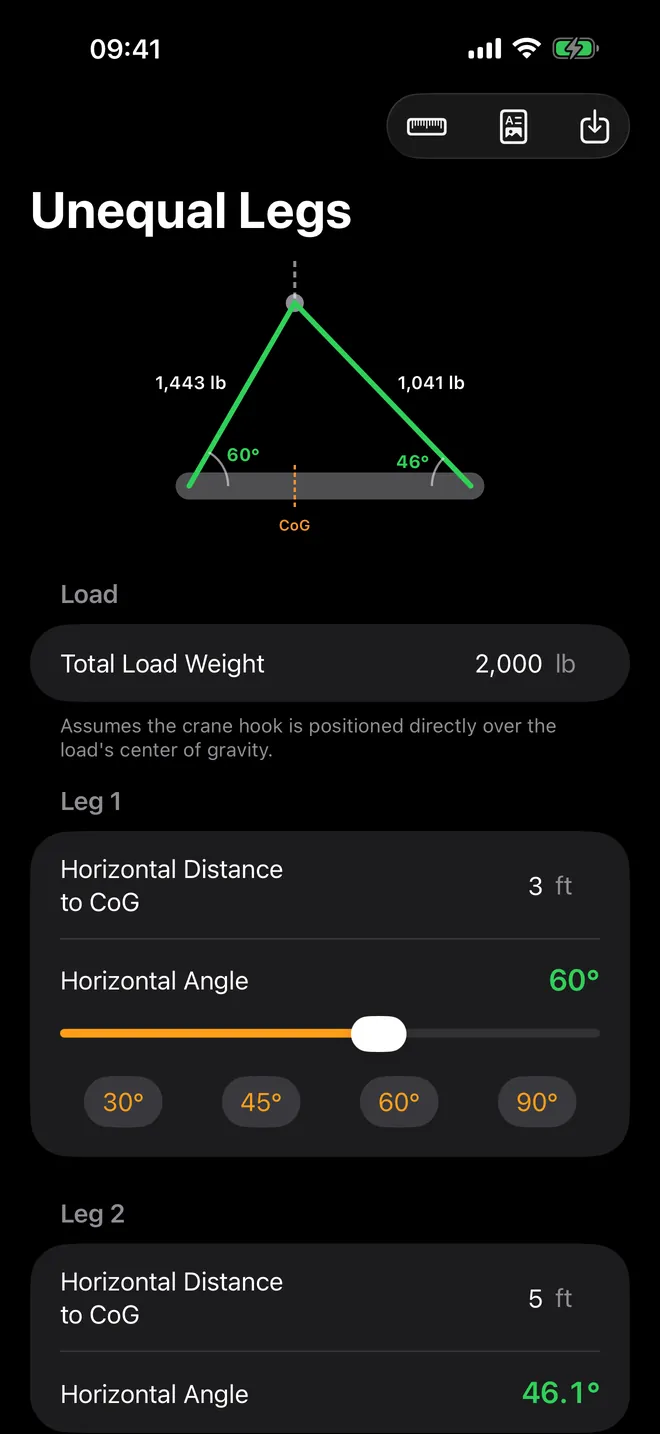
- Sling Tension for a 2-leg pick: enter the Total Load Weight and the Horizontal Angle, and read the Tension per Leg, the Angle Factor and a live sling diagram.
- Sling angle from what you can measure: switch Input to Length & Height, type the sling length and the vertical height, and the app shows the Resulting Angle.
- Hitch Capacity: start from the Vertical Rating (tag WLL) on your sling's tag and get the Effective Capacity in a Vertical, Choker or Basket hitch.
- Angle Reference: a curve and a table of the tension multiplier from 90° down to 30°, in 5° steps.
- History: tap Save on any calculator to keep the inputs and result, then share a saved entry as plain text.
With the optional Pro upgrade
- 3- and 4-leg bridles in Sling Tension, with a Load Type choice of Rigid or Flexible.
- Unequal Legs / CoG Offset for a two-point lift where the center of gravity is not in the middle.
- Load Weight Estimator from shape, dimensions and one of 13 built-in materials.
- A one-page Lift Plan PDF of the calculation on screen, with notes and signature lines.
- No ads.
Quick start: tension on a 2-leg sling
- Open Sling Tension from the Calculators list.
- Type the Total Load Weight, for example 2,000 lb.
- Leave Sling Legs on 2 and set the Horizontal Angle slider to 60°.
- Read the Result: Tension per Leg 1,155 lb and Angle Factor 1.155, with the Angle OK badge.
- Check that each leg's tag shows a vertical rating of at least 1,155 lb, then tap Save if you want a record.
In metric, 1,000 kg on two legs at 60° gives 577 kg per leg. The angle is always measured from the horizontal, not from the vertical.
Free or paid?
RigMaster is free to download. The 2-leg sling tension, the length-and-height angle, the hitch capacity calculator, the angle chart and History are free and show ads. RigMaster Pro is optional: a weekly or yearly subscription, or a one-time lifetime purchase. Pick whichever one you'd actually pay for — all three turn on the same features and drop every ad, so there's no reason to pay more for one over another.
Offline, private, no account
Every calculation runs on the device, so the app works with no signal on a shop floor. A connection is only used for ads in the free version and for buying or restoring Pro. No account, no sign-up.
Saved calculations and settings stay on your iPhone or iPad. The only permission the app asks for is App Tracking Transparency, and only for ads in the free version: if you decline, ads are simply non-personalized.
Units, display and devices
Choose Imperial (lb / ft) or Metric (kg / m) under Units; the first launch follows your device's measurement system. Lengths are typed as decimals, so 6 inches is 0.5 ft. Text Size goes up to Huge for reading at arm's length with gloves on, and the Appearance starts in Dark.
It runs on iPhone (portrait) and iPad (any orientation, with the calculator list on the left and the calculator on the right).
What it does not do
- It has no sling capacity tables for wire rope, chain or synthetic slings; you type the rating from your own tag.
- It does not do crane capacity, load charts, radius or boom calculations, spreader beams or shackle selection.
- It does not find a load's center of gravity; Unequal Legs needs the distances as input.
How-to guides for RigMaster
Questions people ask about RigMaster
Who is RigMaster for?
Does RigMaster need an internet connection?
Does the app know what my sling is rated for?
Is there an Android or Apple Watch version?
What does Pro add?
Free and Pro
Free
- Sling Tension with 2 legs, by Angle or by Length & Height, with the live sling diagram and angle warnings
- Hitch Capacity: Vertical, Choker (75%) and Basket (with leg angle), from the sling tag's vertical rating
- Angle Reference: tension multiplier curve and table from 90° to 30°
- Save to History, share a saved result as plain text, delete
- Imperial / metric units, Appearance and Text Size settings
Pro
- 3 and 4 sling legs in Sling Tension, with the Rigid / Flexible load type
- Unequal Legs / CoG Offset calculator
- Load Weight Estimator
- Lift Plan PDF from any calculator screen that has the Lift Plan button (Sling Tension, Hitch Capacity, Unequal Legs, Load Weight)
- No ads
Pro is optional. Everything in the free list works without it.
What's new in 1.5.0
Corrected the rigging terminology inside the app. Several languages had been machine-translated with the wrong sense of the word: "sling" came out as the catapult, "leg" as the body part, "hitch" as a jerk, and in one language "unequal legs" read as "equal legs" — on the screen that splits the load between uneven legs. Thirty-two terms rewritten by hand across seven languages.
Privacy and support
RigMaster does not require an account. Read the privacy policy and the terms for this app, or write to us if something is wrong.
Made by a small independent developer. Questions? Write to us from the support page.