LiDAR Camera, a night vision camera for the iPhone you already have
Night Vision, Patrol & Astro
On a Pro model with a LiDAR Scanner, or on the front Face ID camera, LiDAR Camera draws a depth view that works with the lights off, picking out shapes like a doorframe or a chair in a completely dark hallway; on any other device it just brightens the live feed, applies one of 12 looks and records video with that look baked in.

Depth view
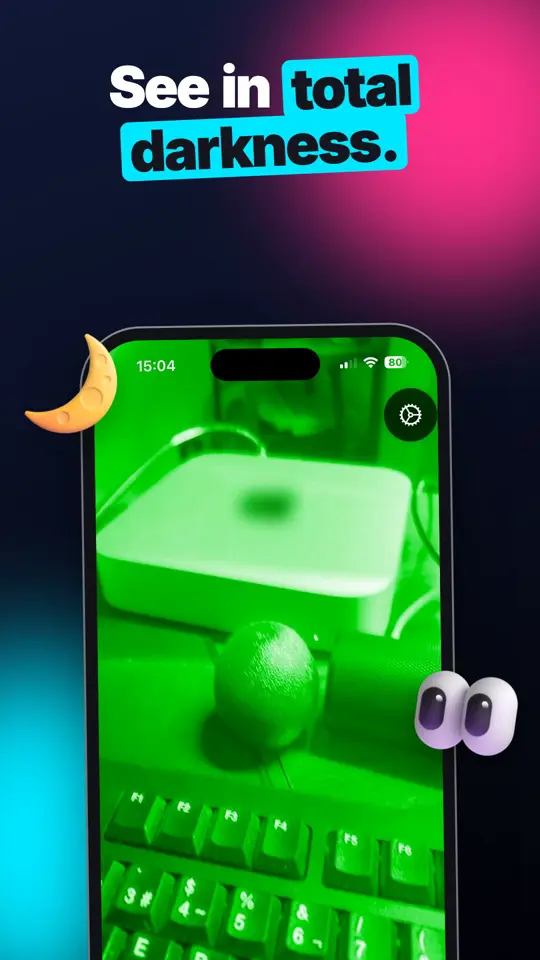
See in total darkness
Depth view with LiDAR or Face ID
Low light
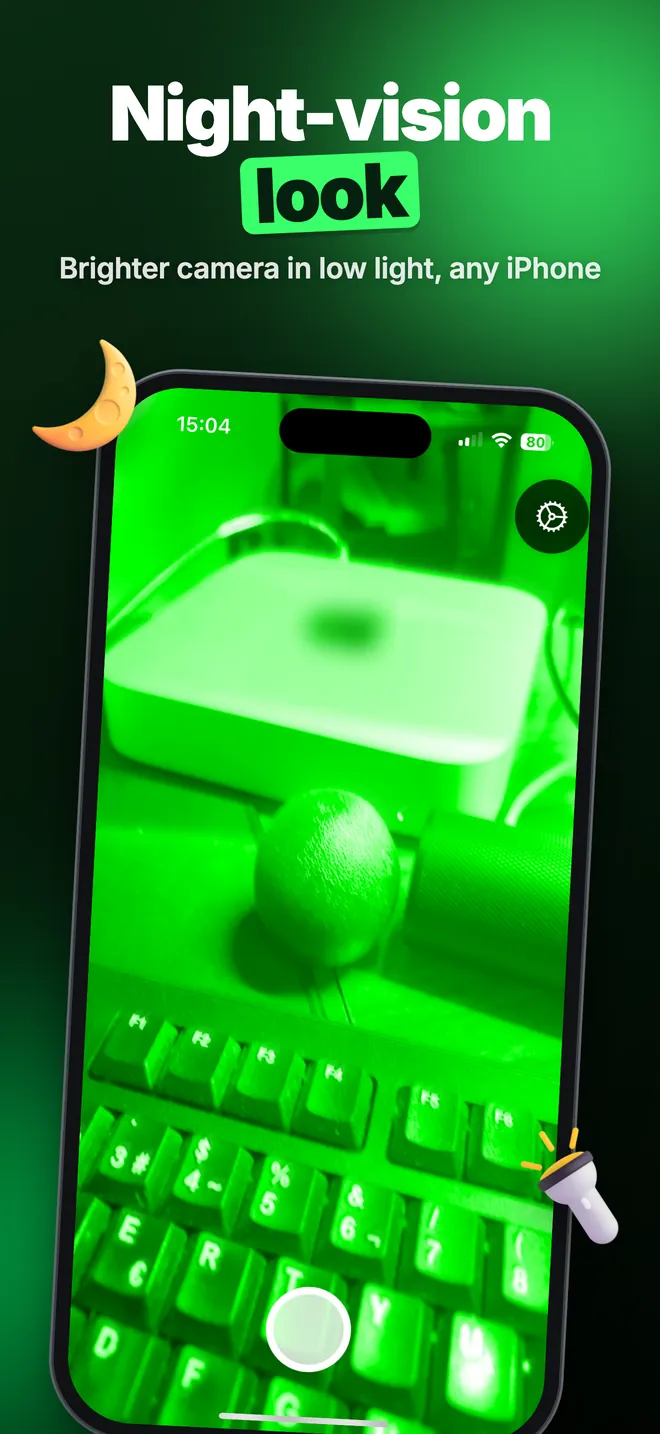
Night-vision look
Brighter camera in low light, any iPhone
Depth colors
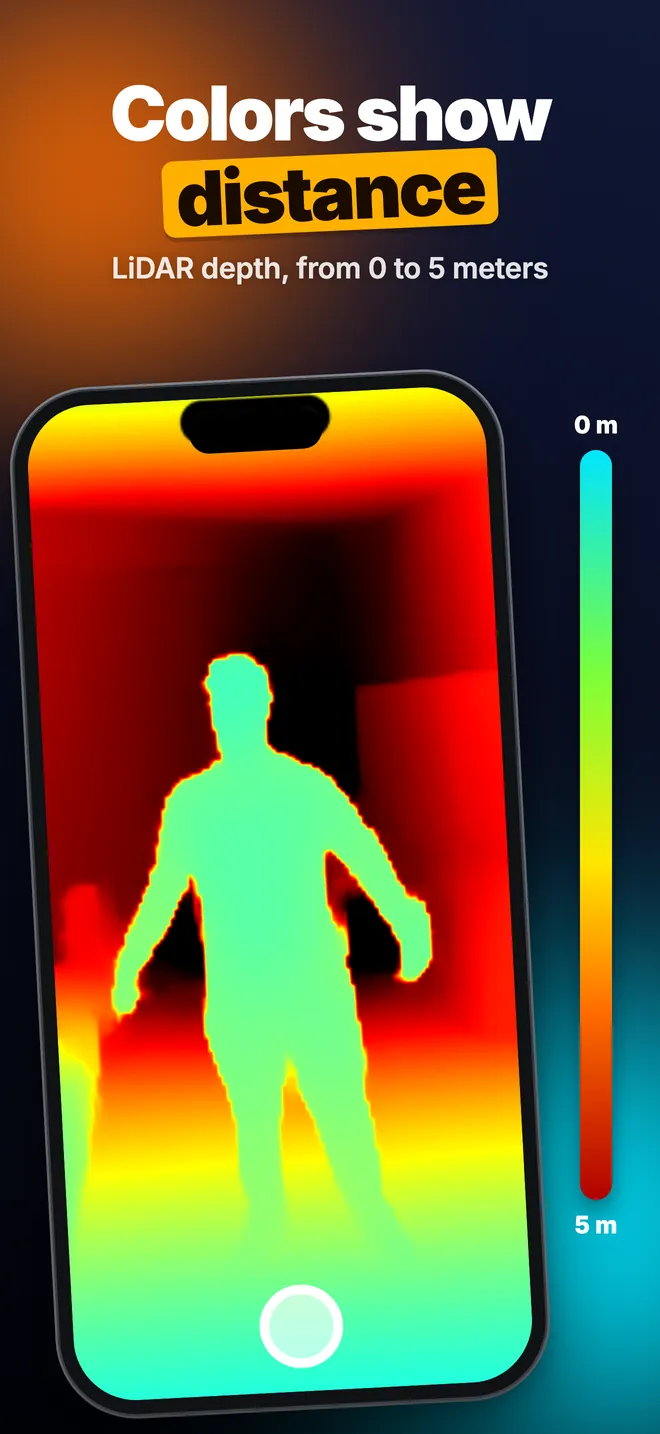
Colors show distance
LiDAR depth, from 0 to 5 meters
What can you do with LiDAR Camera?
See shapes in a pitch-dark room
On an iPhone or iPad with a rear LiDAR Scanner the app opens in LiDAR mode with the Depth Map look. The sensor sends out its own invisible laser pulses, so the picture is the same with the lights on or off: near objects are blue, far ones orange and dark red, up to 5 m.
No LiDAR on your phone? Face ID models get a front depth view instead, shown as TrueDepth Night Vision. Same idea, shorter reach: it is good to about 2 m, and it is built for a face at arm's length rather than a room.
Brighten a dim scene
In Normal mode, available on every device, the app pushes the camera to its highest ISO and longest exposure, blends three frames to cut noise, and applies the look you pick: Night Vision green, Starlight, Phosphor, Grayscale, Thermal and more. This mode needs at least a little light, or the flashlight.
Film, photograph and check a distance
Tap VIDEO to record a clip with the look and sound baked in, or take photos in any mode. With PRO, LiDAR and TrueDepth modes also show the distance to whatever sits in the centre of the frame, in metres with one decimal. It is a quick way to check how far away an outside noise actually was.
Quick start
- Open the app and allow the camera. It starts on the depth view if your device has one, otherwise on the regular camera.
- On a LiDAR device, use the Normal / LiDAR switch under the row of looks to change mode.
- Tap a look in the row above the shutter, for example Night Vision or Depth Map.
- Tap Controls to set Night Vision Intensity (75% by default) and Screen Brightness.
- Choose PHOTO or VIDEO under the shutter and tap the round shutter button.
Free version and PRO
The app is free to download, with no account. For the first 7 days every PRO feature is open, and nothing is charged when that preview ends. After that the free version keeps all camera modes the device supports, 8 of the 12 looks (including Depth Map), unlimited video with no watermark, and 15 photos a day.
Free photos are saved at half width and height with a watermark, and Save, Copy and Share work twice in total. Ads show up too, even during the 7-day preview. Of the two limits, the daily photo cap is the one that bites hardest; the watermark barely registers at half size. PRO, sold as a weekly, monthly or yearly subscription or a one-time lifetime purchase, removes ads and those limits and adds the distance readout, 4 more looks, the timer, scope overlays, manual ISO and shutter, Photo Import and Stealth Mode.
Privacy, offline use and permissions
The camera, depth view, recording and saving all work offline. Internet is only used for ads in the free version and for App Store purchases. Photos and videos stay on the device and reach the Photos app only when you tap Save; nothing is uploaded.
- Camera: needed for everything the app does.
- Microphone: only to record sound in videos.
- Location: only to note where each shot was taken in the Capture Log on your device. Refuse it and everything else works.
- Photos: to save what you choose to keep, and for Photo Import.
What it can't do
No iPhone has a thermal or night-vision sensor that apps can use, so Thermal and Infrared are colour looks, not heat or infrared imaging. The LiDAR depth map is low resolution: shapes and distance, not faces or text, so don't expect to read a sign across a dark room. Video records only in Normal mode. The distance readout is a quick reading of one point, not a tape measure, and there is no Apple Watch, Mac or Android version.
How-to guides for LiDAR Camera
Questions people ask about LiDAR Camera
Does LiDAR Camera really see in the dark?
Which devices does it run on?
Is the app free?
Can I record video with the night vision look?
Do my photos get uploaded anywhere?
Free and Pro
Free
- all three camera modes the device supports: 'Normal' (any device), 'LiDAR' (rear LiDAR Scanner) and the front TrueDepth depth view (Face ID devices)
- 8 of the 12 looks: Night Vision, High Contrast, Phosphor, Arctic, Grayscale, Thermal, Starlight and Depth Map (the pure LiDAR/TrueDepth depth view is free)
- Controls sheet: Screen Brightness and Night Vision Intensity sliders
- flashlight (Normal mode), pinch zoom 1x-10x, double-tap for 2x, long-press to lock focus, camera flip
- photo preview with format picker (JPEG / HEIC / PNG) and quality slider
- Capture Log (history of shots with date, look, mode, device and location if allowed), shareable as text
- a free 7-day preview of every PRO feature from the first launch ('PRO is free until <date>'); nothing is charged when it ends and ads keep showing during it
Pro
- no ads
- no daily photo limit and unlimited Save / Copy / Share at full resolution, no forced watermark
- 4 extra looks: Denoise, Enhance Distant (depth devices only), Infrared, Edge Detect (depth devices only)
- live distance readout to the centre of the frame in LiDAR and TrueDepth modes
- Timer (3 s / 5 s / 10 s countdown before a photo)
- Scope overlays on the viewfinder: Crosshair, Circle, Sniper, Bracket
- Tint: colour of the overlays/zoom label (Classic Green, Amber, Tactical Red, Ice Blue, White Phosphor, Cyan) - it does not recolour the image
- Manual Camera in Controls: ISO and Shutter sliders, AE Lock, AF Lock
Pro is optional. Everything in the free list works without it.
What's new in 1.3.2
Contrast and gamma were printed with six decimals in Hindi instead of two — a lost dot in the translated text turned "1.23x" into "1.234567x". Fixed.
Privacy and support
LiDAR Camera does not require an account. Read the privacy policy and the terms for this app, or write to us if something is wrong.
Made by a small independent developer. Questions? Write to us from the support page.