Fit as: log the walks your iPhone missed in Apple Health
Log Walks, Runs & Hikes
Fit as turns a walk, run or hike your phone missed into steps and walking + running distance in Apple Health: type the distance and time, and it writes the rest for you. It is for anyone whose phone stayed in a locker, on a handrail or at home, and for anyone who wants to add a past workout by hand.

 Android: Fit As: Log Steps & Walks
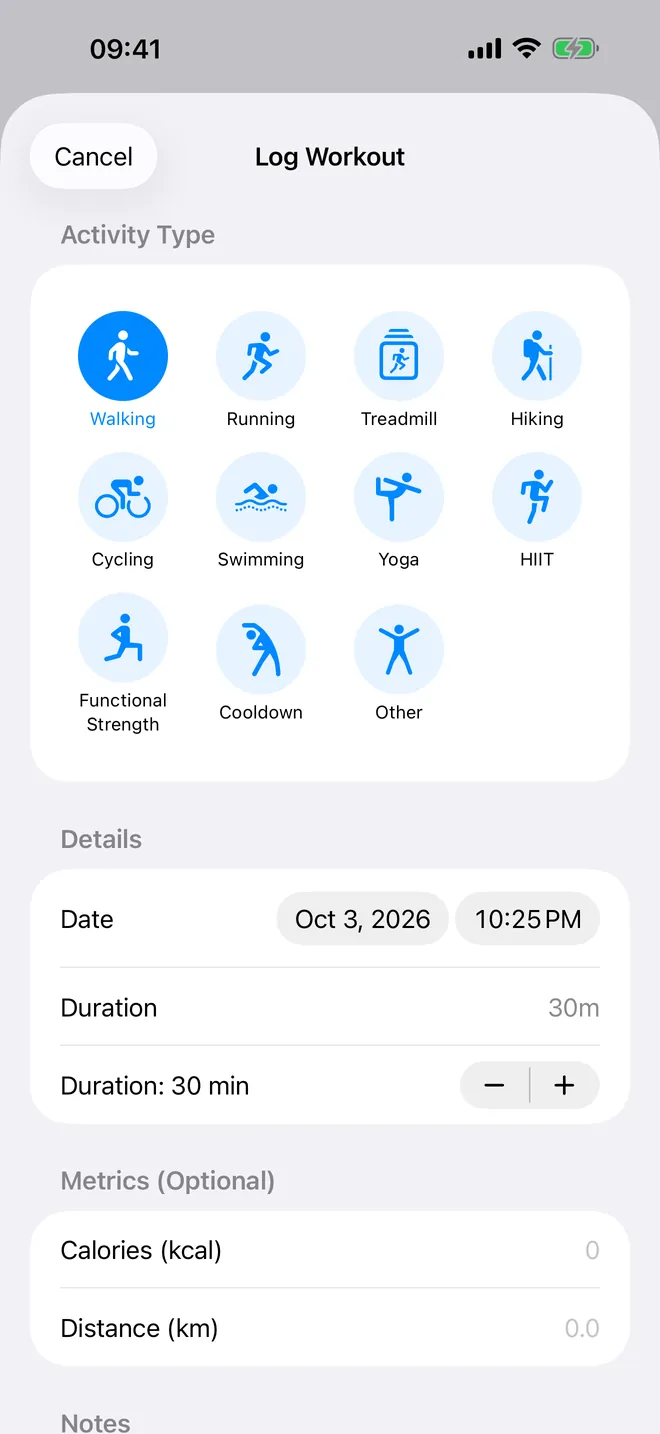
Workout history
Every workout, one list
Distance, pace and calories per session
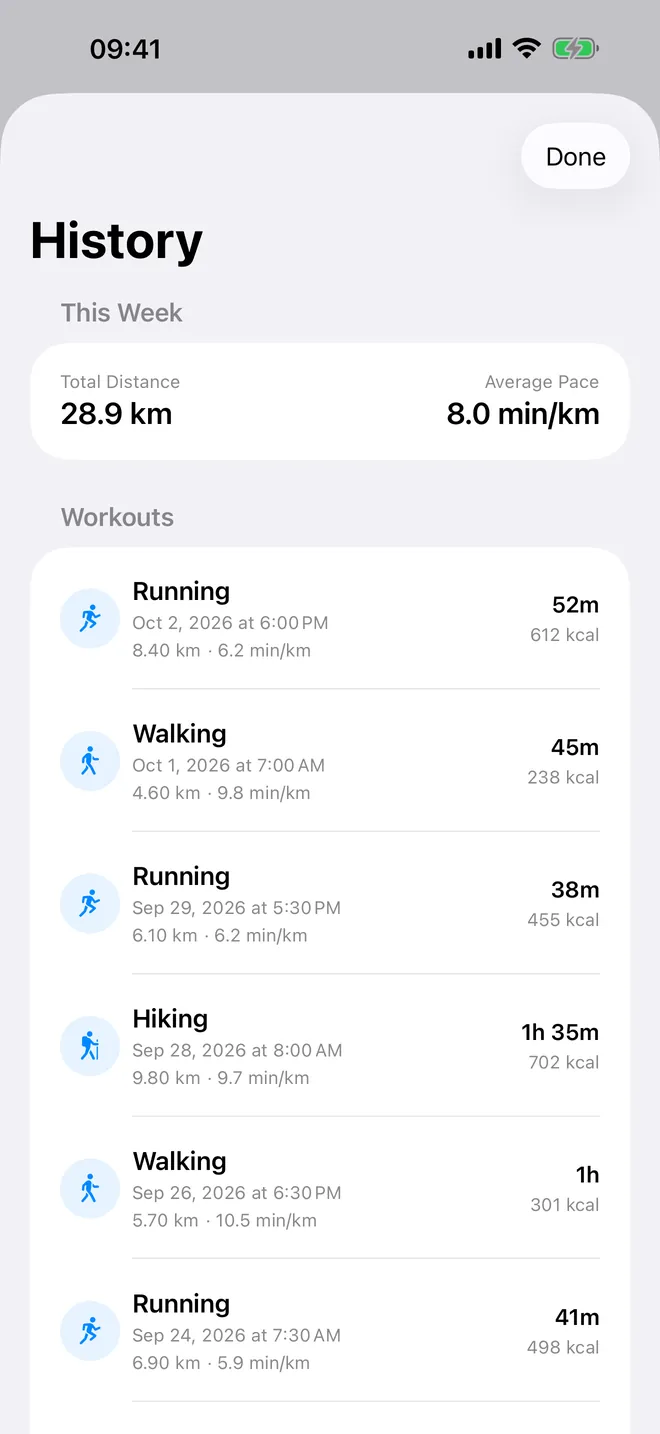
Log workout
Add any workout by hand
Eleven types, with date, time and duration
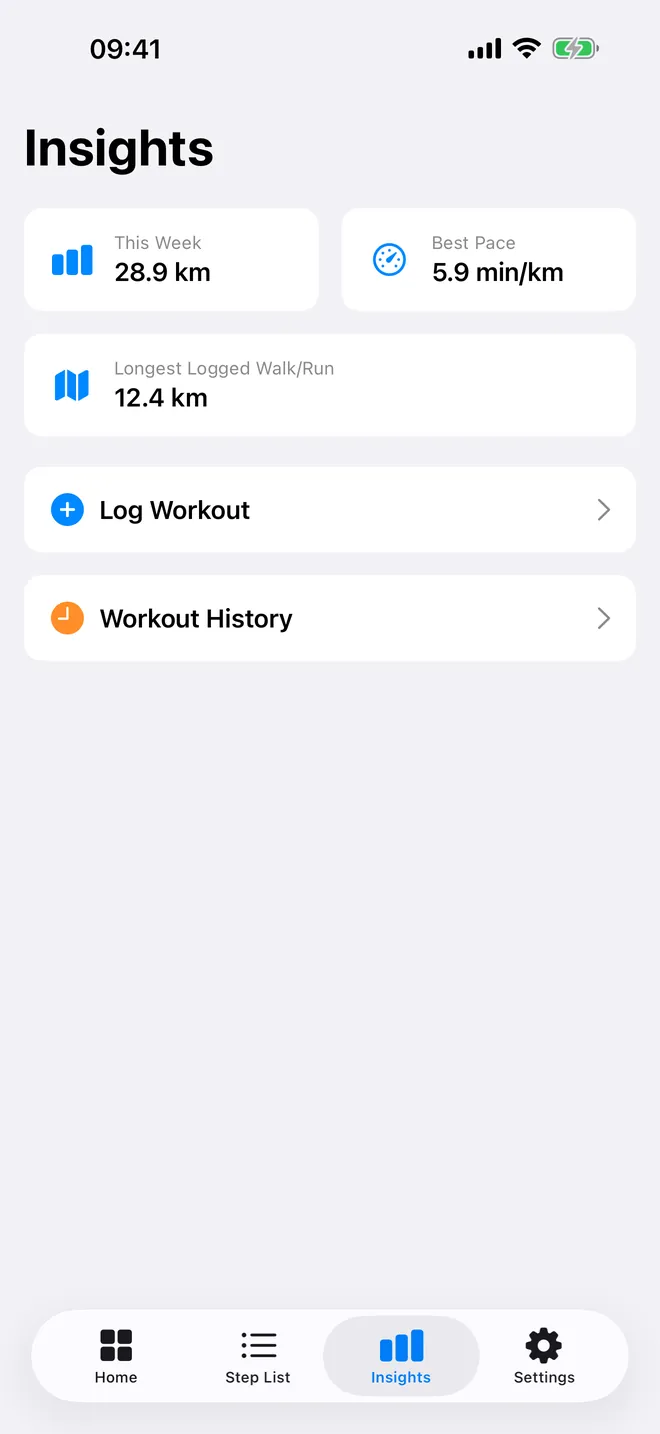
Insights
Your week at a glance
Weekly distance, best pace, longest walk or run
What can you do with Fit as?
Four tabs, one job each. Nothing is measured by a sensor here; every number comes from what you type. The upside is it fills in activity the phone never saw. The downside is it trusts you completely: get the distance wrong and the steps will be wrong too.
- Home: log a walk, run or hike from distance and duration, or from duration and pace. You see the distance, the speed in km/h and the estimated steps before you save.
- Insights: add a full workout with Log Workout (11 types, any past date and time, duration, optional calories and distance) and open Workout History.
- Step List: your daily step totals from Apple Health for the last 30 days, each with an estimated distance.
- Settings: see the fixed stride, switch Dark Mode, jump to the iOS Health permissions with Manage Health Access, and manage PRO.
Quick start
- Open the app and follow the short welcome. On Connect Apple Health, tap Continue and allow Fit as to write and read the data types it lists.
- On the Home tab, pick Walking, Running or Hiking and choose Distance & Duration or Duration & Pace.
- Set the values. With 5.0 km in 60 minutes you see 5.00 km · 5.0 km/h and Estimated: 6561 steps.
- Tap Log Walking — 6561 Steps. In the free version, pick Watch Ad in the Log This Walk prompt.
- A green confirmation reads Walking logged — 6561 steps to Health and the Today total at the top refreshes.
How are the steps worked out?
Steps are distance divided by one fixed stride of 0.762 m per step, shown in Settings under Stride Length. That makes 1 km equal to 1312 steps and 10 km equal to 13123 steps on screen. Anyone with a longer stride than that will see totals run a bit high; a shorter stride runs them low. The stride is the same for everyone and for walking or running, so take the number as an estimate, not a measurement.
Free version and PRO
Fit as is free to download, and logging from the Home tab is unlimited. Each log in the free version comes after a short ad; if no ad can load, the walk is logged anyway, which is the right call. The Log Workout sheet in Insights has no ad at all, ever. PRO (subscription or one-time purchase, as the App Store lists it in your country) removes every ad, skips the ad prompt, unblurs the older days in Step List and adds a daily steps bar chart. If you only use Log Workout, PRO adds nothing there: that sheet is already free and ad-free.
Privacy, offline use and permissions
There is no account and no server of our own. What you log lives in Apple Health on your device. Logging works without internet; the connection is only used for ads in the free version and for buying or restoring PRO.
The app asks for Apple Health write access (to save what you log) and read access (to show today's total, your daily steps and your workouts). The free version also asks for tracking permission for ad personalisation; saying no still shows ads, just not personalised ones. Health data is not used for ads.
Limits worth knowing before you install
- Kilometres only: no miles, mph or min/mile. Convert first (1 mile = 1.609 km).
- Home tab logs always land today, ending at the moment you tap. To backdate, use Log Workout in Insights.
- Home tab logs are steps plus distance, not workouts, so the Walking, Running or Hiking choice is not saved and they do not show in Workout History.
- Notes are not saved, and the app has no edit or delete: fix a wrong entry in the Health app.
- Each other app decides whether it counts data written by another app. Some ignore manually entered data.
- No Apple Watch app, widgets, Mac or Android version, and no export.
How-to guides for Fit as
Questions people ask about Fit as
Is Fit as a pedometer?
Does it work on iPad?
Can I choose the date on the Home tab?
Do I need to create an account?
What does PRO add?
Free and Pro
Free
- Both entry modes: Distance & Duration and Duration & Pace, with live km, km/h and estimated steps
- Log Workout sheet (Insights tab): 11 workout types, date and time, duration, optional calories and distance — no ad, no PRO check
- Workout History with This Week total distance and average pace
- Insights cards (This Week, Best Pace, Longest Logged Walk/Run)
- Today's step total from Apple Health
- Step List: today's row plus this-week steps and distance
- Dark Mode switch
Pro
- No ads of any kind (banner, native, app-open, interstitial)
- Log from the Home tab without the "Log This Walk" ad prompt
- Step List: the previous days' rows (up to the last 30 days) are unblurred
- Step List: a daily steps bar chart (iOS 16+)
Pro is optional. Everything in the free list works without it.
What's new in 5.7.0
The alert you got on the very first tap said "Limit Reached — you have reached the limit of free actions". You had not. There was no free-action counter anywhere in the app and there never had been; the message was simply wrong, and it read like a bait and switch. It now says what actually happens: watch a short ad to log this walk, or get PRO and log as many as you like with no ads. Same three options, honest wording.
Privacy and support
Fit as does not require an account. Read the privacy policy and the terms for this app, or write to us if something is wrong.
Made by a small independent developer. Questions? Write to us from the support page.